Trusted by teams managing 3,000+ buildings across six regions.Read their stories

Resident or tenant? Resident help
See it for your role Get a demo built around how you work Tell us your role and portfolio and we’ll walk you through the workflows that matter to you.
Get in touch
Talk to our team See how MYBOS fits your buildings Book a walkthrough with our team.

Running a mixed‑use building from one system

Apartments upstairs, retail on the ground floor, offices in between and a car park shared by all of them. MYBOS lets one team run every part of a mixed-use building from the same platform, with the right access for each group.

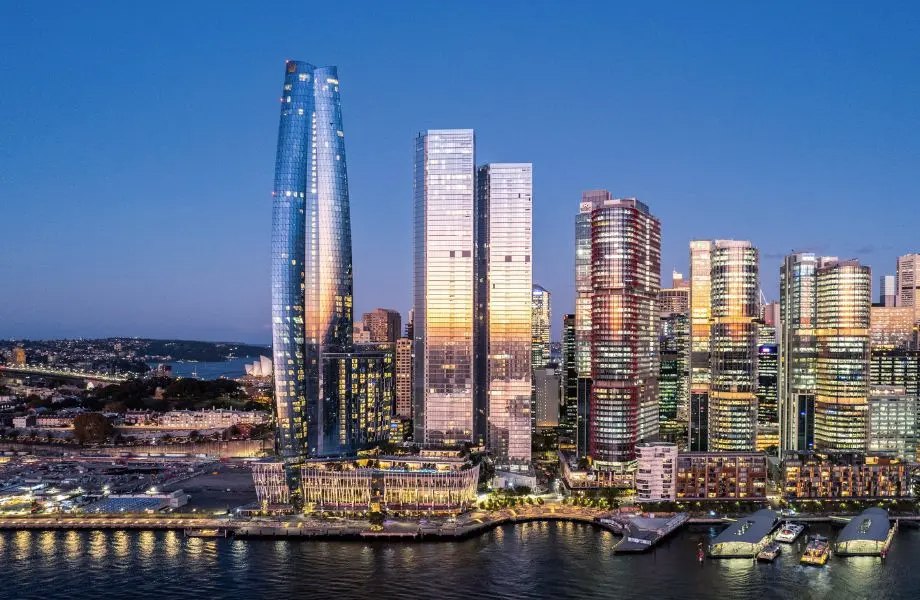
Used at Sydney’s Central Park by Manage Meant, and by Stockwell across diverse assets.

Example building

One building, three user groups

Today
  • Residential tower

    Maintenance request from an apartment

    In progress
  • Ground floor retail

    Shopfront door repair, contractor booked

    Scheduled
  • Commercial level 3

    Visitor and contractor check-ins

    On site
  • Shared car park

    Gate service from the maintenance schedule

    Completed
  • Pool and gym

    Amenity bookings for residents only

    Open
Different users, one record of the building.

Why is a mixed‑use building harder to manage?

Because one building has several groups of users, each with different needs, rules and expectations, all sharing the same structure and services.

Residents want their maintenance requests handled and their amenities available. Retail tenants care about the shopfront and trading hours. Commercial tenants need visitors and contractors managed properly. Underneath all of them sit the same lifts, plant, car park and roof, which someone has to maintain for everyone.

Running each group on a different system, or none, means the building manager spends the day switching between them.

How does one system handle different user groups?

Each group gets the access and features it needs, while maintenance and assets stay in one record.

  • Maintenance for the whole building with every job logged against the right area or asset
  • Amenity permissions so a pool or gym can be bookable by residents only, or by specific apartments
  • Shared amenities across buildings using the Share With option when two buildings share a lift, pool or BBQ area
  • On-Site Check In for commercial visitors and contractors, linked to work orders
  • Targeted communication so notices reach the people they affect

Who runs mixed‑use buildings on MYBOS?

Two of MYBOS's published case studies come from mixed-use operations.

Manage Meant at Central Park

Manage Meant uses MYBOS to run building management across Sydney's Central Park, one of the city's best-known developments. Read the Central Park case study.

Stockwell

Stockwell uses MYBOS to simplify property operations across a diverse, mixed-use portfolio. Read the Stockwell case study.

What if you manage more than one building?

MYBOS connects them under one platform, with a view across all of them and detail for each.

If your mixed-use site is part of a wider portfolio, see our pages on managing multiple buildings from one system and commercial building management software.

“For over 5 years, MYBOS has kept operations smooth and consistent.”

Darren Gardner, Manage Meant

Rated 4.3 out of 5 on Capterra, GetApp and Software Advice, and trusted by over 200 organisations.

Mixed‑use on MYBOS

See MYBOS running a mixed‑use building

Tell us about your building and the groups who use it. We'll show you how MYBOS sets up access, amenities and maintenance for each of them.

If you go ahead, our Australian team helps set up your buildings and bring your records across, and your managers get free training through the MYBOS Training Academy.

Book your demo

No obligation. We'll be in touch to find a time that suits.

Prefer to talk? Email sales@mybos.com or call +61 2 8378 1096.

Mixed‑use building questions, answered

Can residents and commercial tenants use the same system?

Yes. MYBOS supports residential, commercial and mixed-use buildings on one platform. Managers control which features each group can see, so residents and tenants get what is relevant to them.

Can amenities be limited to certain apartments?

Yes. Amenity permissions let you block specific apartments from booking an amenity, so it only appears for the people allowed to use it, such as residents of one tower.

What about amenities shared between two buildings?

MYBOS has a Share With option for amenities, which is useful when two buildings share the same lift, pool or BBQ area. Bookings from both buildings sit on the same calendar.

How are visitors to commercial floors handled?

With MYBOS On-Site Check In. Visitors and contractors scan a building QR code to sign in, can be asked to accept terms or a site induction first, and are visible in a live list of who is on site.

Is maintenance tracked separately for each part of the building?

Maintenance is tracked in one system, with each job logged against the right location or asset. That keeps one history of the building while still showing which area each job belongs to.